
Rolling out AI to a team in a regulated firm takes ten steps. Start with an announcement that protects people's sense of security in their role. Then select the sanctioned tool, map the work and its data boundaries, test one repeatable task, and expand only after the team can grade the result. This sequence is built for banks, insurers, asset managers, capital markets firms, and fintechs where employee adoption and regulatory responsibility have to move together.
Why rollouts fail before the tools arrive
Two problems show up early. Employees feel that automation is being done around them, so they avoid the system or use it only when someone is watching. Compliance, legal, information security, and risk arrive after the design is finished, which leaves them with one practical option: stop what has already been built.
This is where teams get into trouble. A technology pilot can look successful while the workforce does not trust it and the control functions cannot support it. The missing work happened before the first prompt. Nobody agreed on the purpose, the boundaries, the owners, or what would count as acceptable output.
Quiet refusal is easy to miss. Employees complete the introductory session, acknowledge the policy, and return to the old process. The dashboard shows participation while daily work remains unchanged. A rollout has to earn use through relevance, safety, and visible employee ownership. Attendance alone cannot do that.
Regulators are already clear about one point. Existing obligations continue when a firm uses AI. FINRA's Regulatory Notice 24-09 tells member firms to consider supervision, model risk, data privacy and integrity, reliability, and accuracy when generative AI enters their business. The NAIC's model bulletin likewise expects insurers to govern AI-supported decisions and keep consumer-impacting uses within applicable law.
The announcement comes first
Tell the team that an AI initiative is beginning before new workflows appear in their day. Explain what the firm is trying to improve, which decisions have already been made, what remains open, and how employees will take part.
If the initiative is genuinely about capability rather than headcount, say so plainly. If leadership cannot make that commitment, do not borrow the language. Employees will judge the rollout by the decisions that follow, not the launch email.
Give each person ownership of the systems built around their expertise. They know the exceptions, the unwritten checks, the data that should never leave its boundary, and the difference between a polished answer and a correct one. Their role is to help define how the work should run because they are the standard the system has to meet.
Managers should hear the announcement before their teams do. Give them the purpose, the boundaries, the questions employees are likely to ask, and a clear place to escalate what they cannot answer. A manager improvising the message in a team meeting can undo weeks of careful program design in ten minutes.
The ten steps
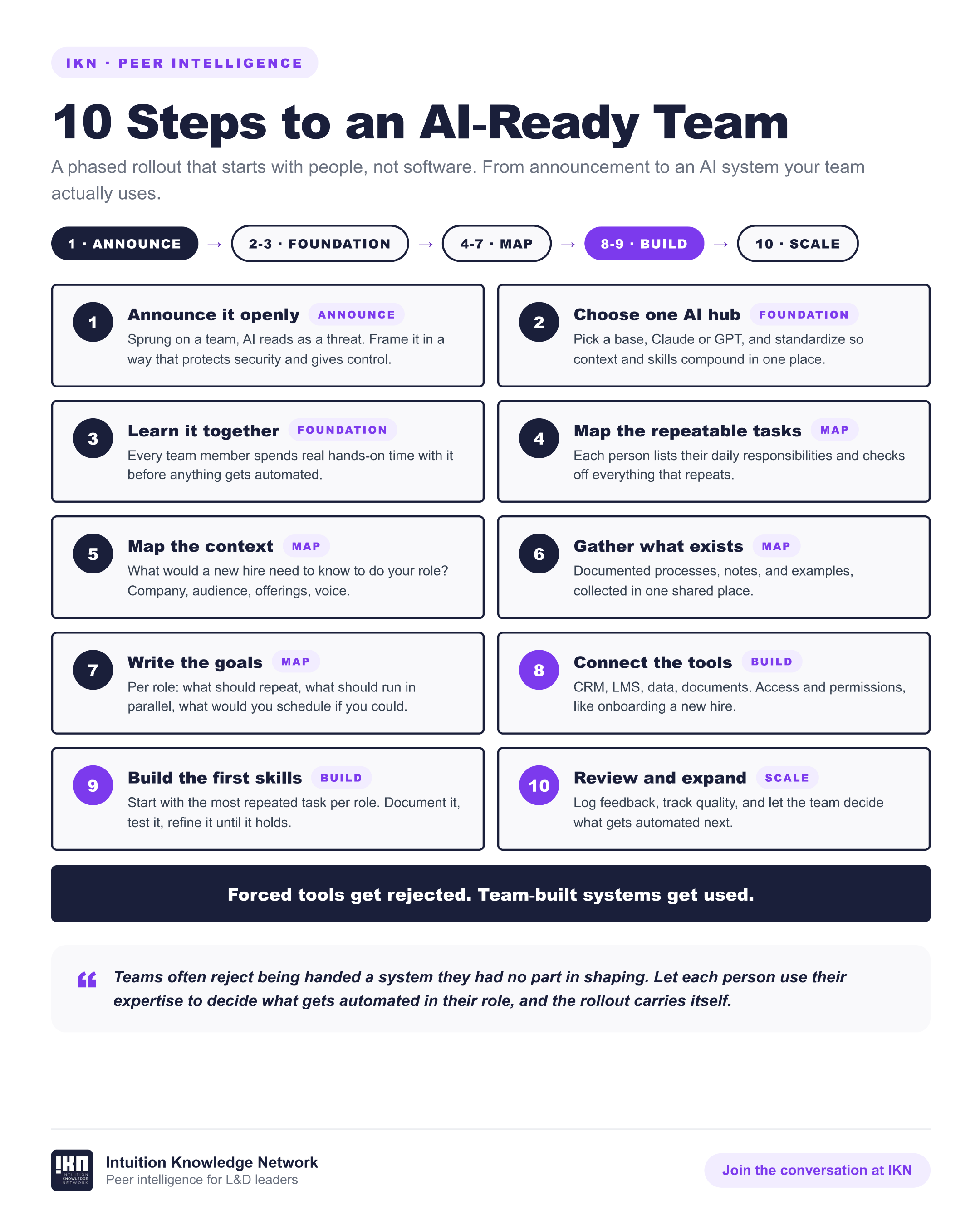
1. Pick the tool your firm has approved
Use the sanctioned platform, even if another product looks more capable. Approval determines the boundary within which the team can learn safely. If nothing is approved, continue with the mapping and documentation steps while the business case and controls are developed.
2. Spend thirty minutes learning it
Give every participant the same short orientation using the vendor's own material. Thirty minutes creates a shared baseline, not mastery. The goal is to make the next conversation about real work instead of buttons and features.
3. Map your role
List the responsibilities that recur every day, week, month, and quarter. Mark the tasks with a describable shape, especially the ones involving research, drafting, comparison, summarization, formatting, or preparation.
4. Map your context
Write down what a capable new hire would need to know to perform the role. Include the audience, vocabulary, tools, standing decisions, escalation paths, quality standards, and information the AI must never assume.
5. Gather what already exists
Bring together approved templates, documented processes, examples, checklists, and style notes. Existing material is often more useful than a new prompt because it carries the organization's actual standard.
6. Get the data answer in writing
Ask compliance, legal, information security, or the designated owner what information may enter the tool and what may never enter it. Record the answer in plain language, date it, and place it where users and the AI workflow can see it.
7. Write the first two documents
Create one context document explaining what the team does and one conventions document explaining how the work is done. Keep both useful rather than exhaustive. Use them for a week, correct what chafes, and let the documents grow through practice.
8. Run one task for one week
Choose one repeatable task with an owner who can grade the result. Run it inside the approved boundary for five working days. Track the weak claims, missing context, unnecessary revisions, and situations where the system should have stopped to ask.
Use the same source material and quality test each day so the team can tell whether the workflow is improving. The purpose of the week is evidence, not a polished demonstration.
9. Turn the graded task into a skill
Fold the corrections into a reusable workflow containing the inputs, steps, examples, guardrails, and definition of done. Where the platform does not support formal skills, keep the workflow as a saved document that users paste into the approved chat.
10. Expand one task at a time, and log the hours
Add the next workflow only after the first one holds up under review. Record the old time, the new time, the revision load, the owner, and any failure or escalation. Quality and control belong beside time saved.
The log is the point
There is an unglamorous reason to keep the log. Six months from now, a list of training completions will tell an executive who attended. A workflow log will show what changed in the work.
The record becomes the budget argument, the headcount defense, and the proof that the initiative produced practical capability. It can show that a quarterly reporting pack moved from six hours to two, that the average review required two corrections rather than twelve, and that three categories of client data were kept outside the workflow entirely.
NIST's Generative AI Profile notes that generative AI use may require additional human review, tracking, documentation, and management oversight. The log supports that discipline while giving the economic buyer something concrete to evaluate. Nobody else in the building will have one unless the rollout creates it on purpose.
At minimum, capture the workflow, owner, permitted data class, time before, time after, number of human corrections, exceptions raised, and final disposition. Keep the record small enough that people will maintain it. A perfect measurement framework that nobody updates is less useful than a seven-column log the team reviews every Friday.
Where a partner fits
Intuition's Digital Literacy Programs work through this progression role by role, inside the firm's sanctioned stack and with the relevant control functions in the room. Enterprise employees, business and functional teams, technical builders, and leaders practice at different levels because their work, risk, and responsibilities are different. If your firm wants support building the capability with its people, we would welcome the conversation.
Frequently asked questions
What if no AI tool is approved yet?
Complete the role, task, context, document, and data-boundary work first. Those steps expose the use cases, requirements, risks, and expected value that belong in the approval case. Do not place firm or client information into an unapproved tool while waiting.
Who should own the rollout?
The capability owner should coordinate it, with technology, compliance, legal, information security, risk, and business experts sharing defined responsibilities. IT should not own the people side alone, and L&D should not be expected to invent the technical controls.
How long until the team sees results?
A bounded task can be tested during the first week after the tool and data rules are clear. A dependable role-level system takes longer because people have to document context, grade output, correct the workflow, and build trust. Promise the first experiment, then let the evidence set the pace.